
Step 1 : Verify Your Account Information
We strongly recommend double checking your CR profile information (especially all your Account Details / Billing Information) to make sure everything is correct and up-to-date.
To do so, click on Profile in the main menu. You will see 4 sections:
- User Details: this contains your personal account details such as your name & address.
- Identity: To validate who it is who will be paid for your earnings.
- Billing Information: this is where you can add or edit things like your preferred payment method, etc.
- Notifications: this shows, among others, the offers on which you have been approved, and other important updates for you!
Don’t forget – we’re able to pay you your hard-earned CrakRevenue earnings via one of these seven available payment methods.
- Bitcoin
- MassPay
- Paxum
- PayPal
- Wire (bank transfer)
Not every affiliate living in every country has all these payment methods available to them. Some restrictions apply. Here are some Payment Restrictions to be aware of.
Remember; by default, our payment terms are set to Net 30 (bi-monthly). That means you get paid 30 days after the end of a period in which you reach your minimum payout. There are two payment days in a month; we pay on the 1st and the 15th of every month.
Our minimum payout is $100, except for Wire, and BitCoin, because the transfer fees are considerably higher. For these, the minimum payout is $500.
If you haven’t reach your minimum payout within one of the periods, the amount will be carried over and processed automatically once you’ve surpassed your minimum payout.
Next steps:
Step 3 : Find the PERFECT OFFER for your traffic and Get Your Links Up
Don’t leave without checking out our last Webinar!
Can I get paid even though I’ve earned less than $100?
Unfortunately, you must reach the defined minimum payout to be paid.
The minimum payout is $100.
If you’re struggling to reach this amount, first we must understand why.
There may be 5 Reasons You’re Not Reaching Your Minimum Payout…
#1 – You don’t have enough traffic
And as painstakingly obvious as it may be, if you’re not receiving enough traffic to your site or campaign, generating conversions — much less reaching your minimum payout — is going to be a constant battle. Especially generating enough conversions to push you past that payment threshold!
#2 – You don’t have the right traffic
Not every offer you push is going to result in sales with every traffic source. A not-so-right traffic source can cause a domino effect…
#3 – You’re all over the place
Focus on the quality of your campaigns, not quantity.
#4 – You’re jumping the gun
If you’re seeing 23 uniques to an offer but no leads, don’t halt your campaign, don’t contact support or your Affiliate Advisor—give it time. Don’t act too hastily when just beginning to send traffic to something.
#5 – Your Ads are getting blocked by AdBlock and you’re not doing anything about it…
Read more here:
5 Reasons You’re Not Reaching Your Minimum Payout
Cashing / depositing CrakRevenue’s check
NOTE: As of February 1, 2023, CrakRevenue no longer offers check payments.
Please refer to the link below to learn more about our available payment methods and their restrictions:
How can I modify my payment information?
Select Profile > Billing Information
Modify the necessary fields & make sure you Save any changes when done!
All Billing Information configuration & any modifications must be made at least 5 days before the end of the period, otherwise any due payment will be automatically postponed to the next payment period.
6 reasons why you didn’t receive your payment
Here are the main reasons why you didn’t receive your payment:
1. You haven’t reached your minimum payout yet.
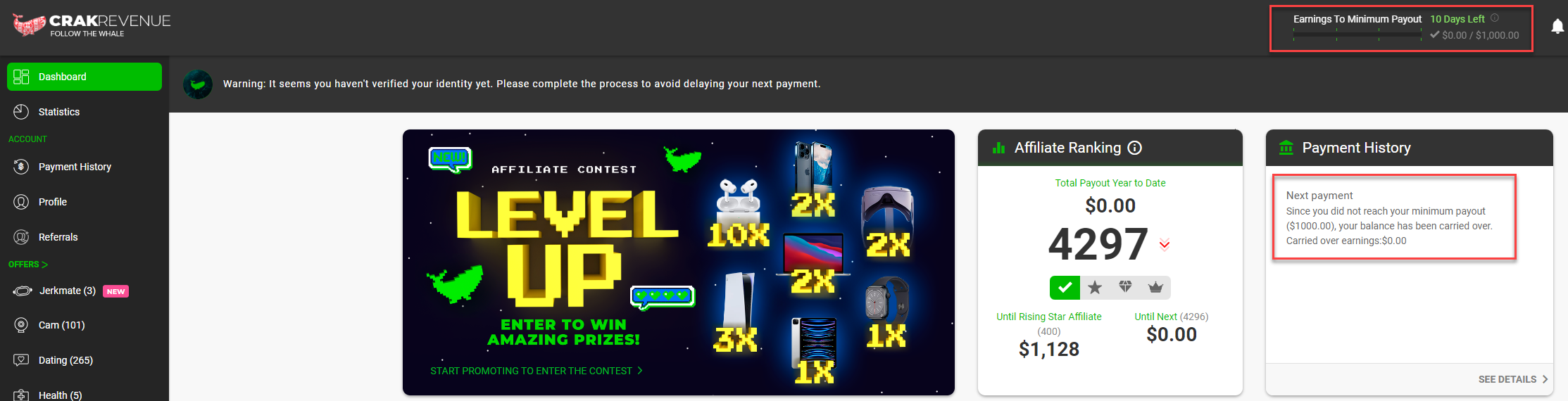
Your dashboard will indicate your current balance and your commission amount will be carried over until you reach your minimum payout.
When that’s the case, an invoice amount will be shown with the status Carried Over. All the carried over invoices that are not yet paid will be when the sum of all of them will reach the minimum payout amount.
2. It hasn’t been 30 days since the end of the period yet.
We pay Net 30 (bi-monthly)*. That means you get paid 30 days after the end of a period in which you reach your minimum payout.
There are two payment periods per month. The first starts on the 1st of the month and ends on the 15th. The second period starts on the 16th and ends on the last day of the month.
Example: If you reach your minimum payout during the March 1 to March 15 period, your payment will be sent on April 15.
3. You didn’t select a payment method in your profile.
4. You did not modify your billing information in time.
All Billing Information configuration & any modifications must be made at least 5 days before the end of the period, otherwise any due payment will be automatically postponed to the next payment period.
5. Your payment information is not accurate, complete, or valid.
6. (If you are using Paxum) The e-mail address or your Paxum account information you put is inaccurate/incomplete.
If your situation is different from the ones mentioned above and you haven’t yet received a payment, contact our Support team by chatting with us or at support@crakrevenue.com!
Check your payment terms here:
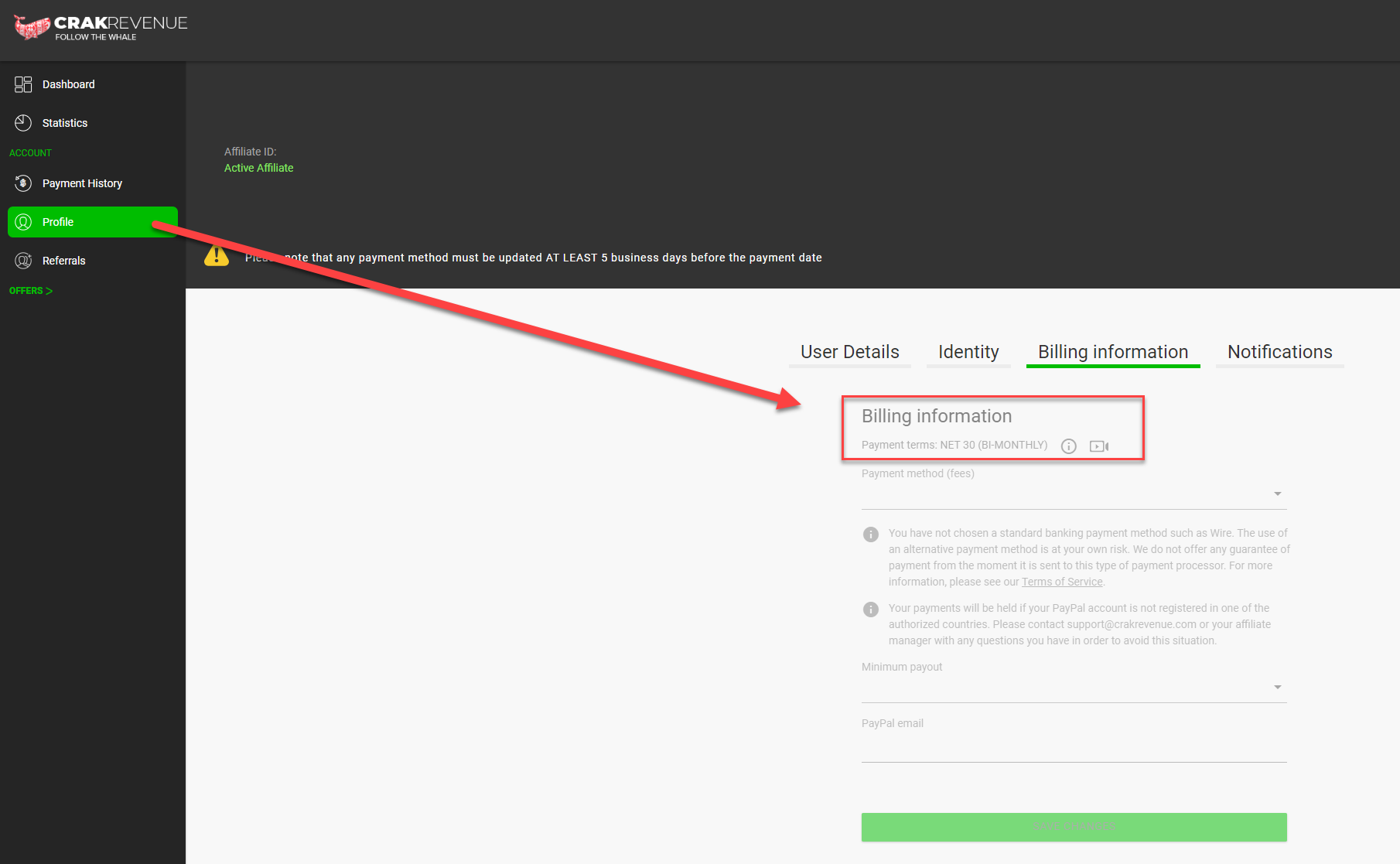
*Payment terms may vary from an affiliate to another.
Where can I see my paid amount and my payment history?
Select ”Payment History” to view your invoices and payments. On this page you will have an overview of your account balance, your individual invoices, and your individual payment receipts.

An invoice is generated every period if the amount is more than $0,00
A brief summary is also shown on your dashboard:

Does CrakRevenue offer tutorials?
You want to know and understand how to use our platform efficiently? Check out our webinars and tutorials! Short and easy to understand, you’ll become a CrakRevenue master in no time after watching these!
Knowing your way around the platform
Everything about Offers:
Everything about Stats:
Where is the conversion coming from?
Here’s What You Should Know About EPC
Tracking Made Easy with Global Postbacks
Everything about Payments:
What does ”carried over” mean?
Crak’s Tools:
Everything you need to know about Smartlinks
What are Google Compliant Ads?
Hey! Got suggestions for our next tutorials? GREAT! Let us know your idea(s) at support@crakrevenue.com !
What payment methods do you offer?
Currently, we pay in USD by MassPay, Bitcoin, Paxum, PayPal, and Wire (bank transfer).
Certain exceptions may apply, depending on your carrier, country, and/or financial institution.
As per our terms of service, the use of any method is done at the affiliate’s own risk and may be subject to additional fees, and delays.
Read more:
What is the minimum payout and the terms of payment?
Remember: The minimum payout is $100 for MassPay, Paxum and PayPal, and $500 for BitCoin and Wire transfers.
There are two payment periods per month. The first starts on the 1st of the month and ends on the 15th. The second period starts on the 16th and ends on the last day of the month.
Please note that if a payment date falls on a week-end, payments will be processed the Friday before.
Here are the 3 available terms of payment:
Net 30 (Bi-monthly)
- The affiliate is paid 30 days after the end of the payment period in which he reached his minimum payout.
- Payment dates: the 15th and the last day of the month.
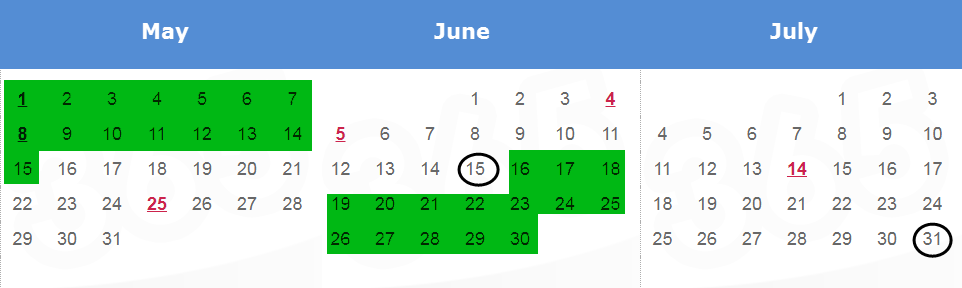
For example: If you reach your minimum payout during the May 1 to May 15 period, your payment will be sent on June 15.
If you reach your minimum payout during the June 16 to 30 period, your payment will be sent on July 31st.
Net 15 (Bi-monthly)
- The affiliate is paid 15 days after the end of the payment period in which he reached his minimum payout.
- Payment dates: the 15th and the last day of the month.
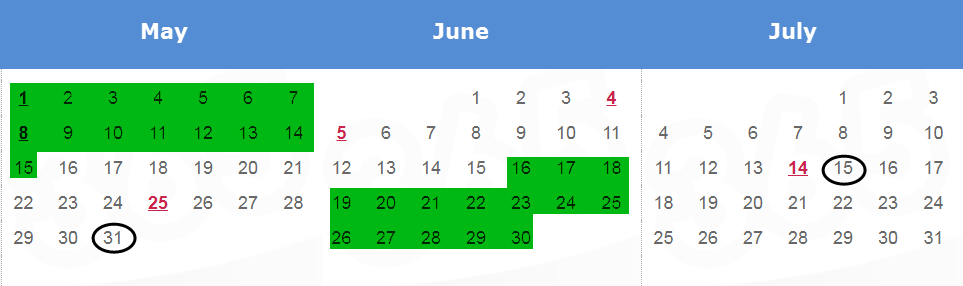
For example: If you reach your minimum payout during the May 1 to May 15 period, your payment will be sent on May 31st.
If you reach your minimum payout during the June 16 to 30 period, your payment will be sent on July 15th.
Net 7 (Bi-monthly)
- The affiliate is paid 7 days after the end of the payment period in which he reached his minimum payout.
- A minimum of 500$ must have been reached to send a payment, even if the affiliate choses a smaller minimum payout in his preferences.
- Payment dates: the 7th and the 22nd.
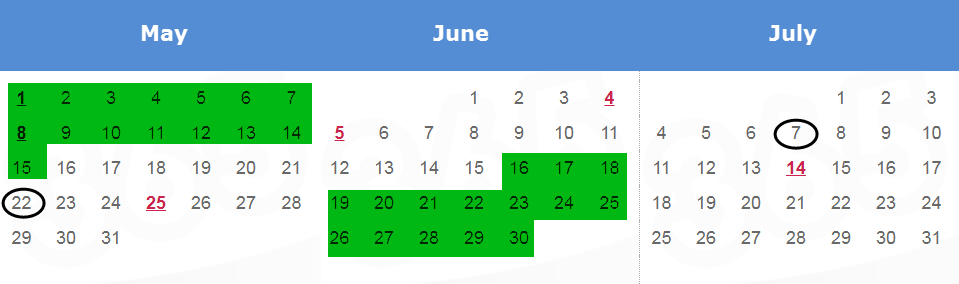
For example: If you reach your minimum payout during the May 1 to May 15 period, your payment will be sent on May 22nd.
If you reach your minimum payout during the June 16 to 30 period, your payment will be sent on July 7th.
N.B. Dates highlighted in green represent a period, and dates circled in black represent the payment date. Please note that any payment will require a transfer delay of minimum 48 business hours.
IMPORTANT NOTE: Any Billing Information configuration & any modification must be made at least 5 business days before the end of the period, otherwise any due payment will be automatically postponed to the next payment period.
Discover MassPay, Our Best Payment Method
Availability
MassPay is available in more than 240 countries and markets. That also means cashing in your profits in over 70 currencies, including cryptocurrencies. (Make sure to check country restrictions)
No need to create another account: it’s done automatically with your email address! MassPay sends you your monthly payouts on our behalf, and you can cash them in using one of these 4 ways*:
- Bank deposit (local currencies)
- InstaPay (to a debit card)
- Cryptocurrency options
- Bank wire transfer (in USD)
* Some options are only available in specific countries.
What are the benefits of using MassPay?
- Faster Payments: Thanks to MassPay, CrakRevenue Affiliates can receive their earnings more quickly compared to traditional payment methods.
- Reduced Payment Processing Time: MassPay streamlines the payment process by enabling businesses to send payments to multiple affiliates in a single transaction. Less management for timely payments!
- Improved Cash Flow Management: With faster and more predictable payments through MassPay, CrakRevenue Affiliates can better manage their finances and plan their expenditures. This stability can help them invest in growing their business or cover expenses more effectively.
- Lower Transaction Costs: MassPay may offer lower transaction fees (1 USD) than alternative payment methods, allowing CrakRevenue Affiliates to retain a higher percentage of their earnings.
- Enhanced Convenience: MassPay provides a convenient way for CrakRevenue Affiliates to receive payments, often offering various payment options such as bank transfers, prepaid cards, or digital wallets. This flexibility allows affiliates to choose the payment modality that best suits their preferences and needs.
- Reliability and Security: MassPay services prioritize security and reliability, ensuring CrakRevenue Affiliates’ payments are processed risk-free and accurately.
These advantages contribute to a more efficient and rewarding experience for CrakRevenue Affiliates.
How can I make the switch to MassPay?
For your next payment, simply log into your CrakRevenue affiliate dashboard. Then, select MassPay.* Your MassPay account will automatically be created with your email address. To manage your MassPay account, you’ll have to log in and determine which way you want to withdraw your funds and when.
*Remember, the change must be made at least five business days prior to your next payment.
Fees:
A 1.00 USD fee applies for each transaction.
How long will MassPay payments take?
On the payment day, MassPay will issue your payment instantly*. It can take you up to 48 hours to be able to withdraw the funds, depending on your country and financial institution. If there’s any delay on our part, we will let you know!
*Note that choosing MassPay as your payment method does not change your payment date according to CrakRevenue’s payment terms.
MassPay isn’t the best option for you?
We may have something for you! Check out your alternatives, as well as their restrictions, to see if it fits your situation!
Any questions? Get in touch via the live chat on the CrakRevenue portal!
Related articles
What is the minimum payout and the terms of payment?
FAQ – Identity Validation
Find answers to the most frequently asked questions regarding our identity validation process.
Q: Why can’t I change my name and country in the beneficiary section of my billing information?
A: Your beneficiary information must match the validated identity. You can restart the validation process in the Identity section of your profile.
Q: I don’t have a company registration number. What should I do?
A: Registration numbers are only asked for Company Accounts. If you don’t have a company number, select Individual Account in the Identity section of your profile and follow the instructions to complete the validation process.
Q: My validation status is FAILED. What should I do?
A: Something went wrong during the validation process. Please make sure the lighting is good in your room and that the text is readable on your ID. We recommend using your mobile phone to validate your identity. Jumio’s identity validation process is compatible with any device. Please refer to Jumio’s FAQ or contact us if the process fails multiple times.
Note: You must show your entire ID, including all edges.
Q: My validation status is still PENDING. What should I do?
A: Processing your identity may take a few minutes. You can refresh the page for status updates. After 30 minutes, your status will either switch to VERIFIED or FAILED. If your status is still pending after 30 minutes, please contact our Customer Experience Team.
Q: My validation status is PROCESSING. What should I do?
A: We are doing a few extra validations on your account. Please contact our Customer Experience Team if your status remains PROCESSING for more than five (5) business days.
Q: My validation status is REJECTED. What should I do?
A: Your identity validation can be rejected for multiple reasons. Please contact our Customer Experience Team for assistance.
Q: My validation status is VERIFIED. What should I do?
A: You’re all set. You can now complete your Billing Information.
Q: Nothing happens when I click on the button to verify my identity. What should I do?
A: The identity validation process is completed in a separate tab. Please make sure your browser is not blocking the new tab.
Q: What do the different identity validation statuses mean?
A: Here is the definition of each identity validation status:
PENDING: The pending status means your identity validation is being reviewed. Reviewing your identity may take a few minutes. You can refresh the page for status updates. After 30 minutes, your status will either switch to VERIFIED or FAILED. If your status is still pending after 30 minutes, please contact our Customer Experience Team.
VERIFIED: The verified status means your identity has been validated and approved by CrakRevenue. Thank you for contributing to stronger partnerships!
FAILED: The failed status means something went wrong during the validation process. Please ensure the lighting is good in your room and the text is readable on your ID. We recommend using your mobile phone to validate your identity. Jumio’s identity validation process is compatible with any device. Please refer to Jumio’s FAQ or contact us if the process fails multiple times.
REJECTED: The rejected status means we couldn’t validate your identity based on your ID and biometric data. Your identity validation can be rejected for multiple reasons. Please contact our Customer Experience Team for assistance.
PROCESSING: The processing status means we are performing a few extra validations on your account. Please contact our Customer Experience Team if your status has remained PROCESSING for more than two (2) days.
Q: I don’t have the verified status. What are my options?
A: Please refer to this article to learn more about our identity validation process and statuses. If your status is FAILED, please try again and make sure your ID is valid and readable. You can also contact our Customer Experience Team for assistance.
Q: How long does it take to validate my identity?
A: CrakRevenue’s identity validation process is quick, safe and easy! It should take no more than 2 minutes. If you’re having trouble validating your identity, please contact our Customer Experience Team for assistance.
Q: How many attempts do I have to validate my identity?
A: We’re here to help! If you’re having trouble validating your identity, the first thing to do would be to try again:
- Make sure the lighting is good in your room.
- Make sure the text is readable on your ID.
- We recommend using your mobile phone to validate your identity.
You have unlimited attempts. However, if your attempts keep being rejected, please contact our Customer Experience Team. We’ll be glad to take a closer look and get more information from our identity validation partner.
The answer you’re looking for is not there?
Get in touch with us via our live chat!
How do I validate my identity?
All you need to do is snap a picture of your ID and take a corroborating selfie. ?
Here’s a quick video tutorial to guide you through Jumio’s swift process:
Note: You must show your entire ID, including all edges.
Need help? Find useful answers in our FAQ.
The answer you’re looking for is not there?
Get in touch with us via our live chat!
How does this process benefit me?
Verifying your identity strengthens the security of your account with enhanced fraud protection.
Moreover, our process strongly contributes to maintaining advertisers’ confidence in our network, resulting in more exclusive affiliate programs & offers, additional bumps and higher payouts.
This measure also enables us to provide our affiliates with more flexible payment options, such as Weekly Net 7.
We remain at your disposal for any further information.
Get in touch with your Affiliate Manager or chat with our Customer Experience Team for assistance 365 days a year.
Thank you for helping us ensure the security of your account and compliant practices!
Why does CrakRevenue require identity validation?
CrakRevenue invites all new and existing affiliates to complete the identity validation process with our chosen service provider, Jumio.
Our simple, quick and secure process is part of our ongoing compliance efforts.
It will help us pursue stronger partnerships with you and our advertisers, aiming at monitoring account fraud and meeting numerous compliance requirements.
Jumio is a leading AI-powered identity proofing service used by world-leading digital and financial companies.
It has verified more than 500 million identities to date.
Jumio uses informed AI to automate online identity verification on any device, from anywhere in the world.
Please refer to our Knowledge Base’s Identity Validation section to learn more about our identity validation process.
Don’t hesitate to contact us for assistance if needed.
Consult our Privacy Policy and Jumio’s Privacy Policy to learn more about how the information you submit is collected, used, and disclosed.
Why I haven’t received my payment?
Here are the main reasons why you didn’t receive your payment:
1. You haven’t reached your minimum payout yet.

Your dashboard will indicate your current balance and your commission amount will be carried over until you reach your minimum payout.
When that’s the case, an invoice amount will be shown with the status Carried Over. All the carried over invoices that are not yet paid will be when the sum of all of them will reach the minimum payout amount.
2. It hasn’t been 30 days since the end of the period yet.
We pay Net 30 (bi-monthly)*. That means you get paid 30 days after the end of a period in which you reach your minimum payout.
There are two payment periods per month. The first starts on the 1st of the month and ends on the 15th. The second period starts on the 16th and ends on the last day of the month.
Example: If you reach your minimum payout during the March 1 to March 15 period, your payment will be sent on April 15.
3. You didn’t select a payment method in your profile.
4. You did not modify your billing information in time.
All Billing Information configuration & any modifications must be made at least 5 days before the end of the period, otherwise any due payment will be automatically postponed to the next payment period.
5. Your payment information is not accurate, complete, or valid.
6. (If you are using Paxum) The e-mail address or your Paxum account information you indicated is inaccurate/incomplete.
7. (If you are using ePayService) The name 16-digit account wallet number do not match, or the account information you indicated is inaccurate/incomplete.
8. (If you are using ACH) Any transfer to accounts ultimately linked to Payoneer accounts will be returned.
If your situation is different from the ones mentioned above and you haven’t yet received a payment, contact our Support team by chatting with us or at support@crakrevenue.com!
Be sure to validate your payment terms here:

*Payment terms may vary from an affiliate to another.
9. (If you are using someone else’s account) Using someone else’s name/account needs to be discussed with them. We can confirm payment status, but we cannot guarantee the funds are ultimately transferred to you.
Payment not received yet; what are the delays per payment methods?
The actual payment may, or may not, occur on the scheduled payment date, depending on the method.
Here is an approximation, for each of our payment methods:
MassPay: Instantly
Bitcoin: Usually same day
Paxum: Usually same day, up to 48h (2 business days)
PayPal: Usually same day
Wire: 1 – 10 business days,
You can always check out this article for more information on payments.
Just remember these do not reflect additional delays that may be caused due to unforeseen circumstances otherwise out of our control, as a result of, but not limited to, local laws, bank processing standards, additional verification, shipping times, local holidays, server status, and check shipping times.
Weekend payments: Since payments are done manually, we will try to get payments done on the day listed on your dashboard! If the 15th/last day of the month falls on a weekend, it is important, however, to keep in mind that even though we will try to pay on the Friday before a weekend payment date, payments may only be done as per the regular schedule, on the following Monday
*Any transfer to accounts ultimately linked to Payoneer accounts will be returned. Additional delays may apply. To avoid these delays, we suggest using a new payment method.
Is your e-wallet, banking information, or address, listed under someone else’s name? Your best bet would be to check with that individual. They may know more than we do since it’s their account we’re talking about! Remember we cannot be responsible for the funds following the completion of a payment, especially if the account is for someone else.
Read more:
What is the minimum payout and the terms of payment?